I attended three-day Palantir developer training this past week. Palantir is an incredibly useful technology and I can’t wait to start coding for it at work.
Palantir Developer Training
Leave a reply
I attended three-day Palantir developer training this past week. Palantir is an incredibly useful technology and I can’t wait to start coding for it at work.
Found a great use for the iphone app Orchestra. Its main purpose is to help you make todo lists by speaking them and it converts it to text. But… I found a cool trick… my daughter frequently needs help spelling longer words she hasn’t learned yet for papers and reports, etc. It would take her a while to look up the word online or in a dictionary and it really added up when she had a long paper to write and had to look up the spelling of lots of words. Now, I let her use Orchestra – she just says the word and it shows her how to spell it almost instantly. For every individual word she has tried it (so far) has been 100% correct.
I setup FreeNAS and it has a builtin UPnP server so I was looking for a way to view the videos (AVI/DIVX/XVID/MPG/etc) on my ipad. I finally found 8Player. Costs $5 but it streams all music, videos and pictures like a champ. Well worth the $5. I tried almost every other one I could find that did UPnP and this one was the best.
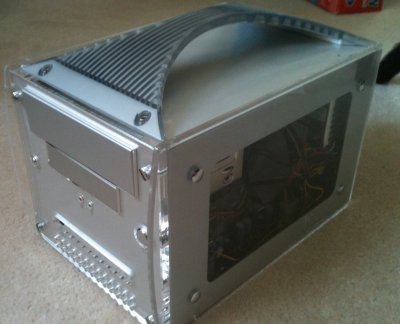
Over the weekend I installed FreeNAS 7 (not the latest – 8) on a mini PC I was looking to sell. Nobody wanted to buy it and I had read recently on Lifehacker about FreeNAS. I’ve been wanting a central file server for a while now that could house MP3s and movies, etc and stream it to various devices (iphone, ipad, Xbox 360, XBMX, etc) and this sounded perfect. I got it all setup finally despite it being somewhat involved and non-intuitive. I wanted to plug in my 500GB USB HD into it but it says not to use NTFS with it so if I want to do that I’m going to have to copy all the data off of it (not sure I have ~300GB of extra space anywhere), format it for FreeNAS, then copy the stuff back. Maybe I’ll just get an internal drive for it instead and start fresh.
With Teenormous, we started giving away free tees to people that tweet a link to us. Problem is, we couldn’t find an easy solution to archiving/looking back on tweets for the month. Twitter keeps the tweets seachable for a very short time. We found a few web apps/services that did some similar things but not exactly what we wanted. We even tried Google Reader by putting the search RSS feed into it. (That worked, but trying to scroll and count to #57 is a royal pain and that method just doesn’t scale.) So, some poking around led me to the excellent Ruby library for Twitter by John Nunemaker which uses the Twitter APIs.
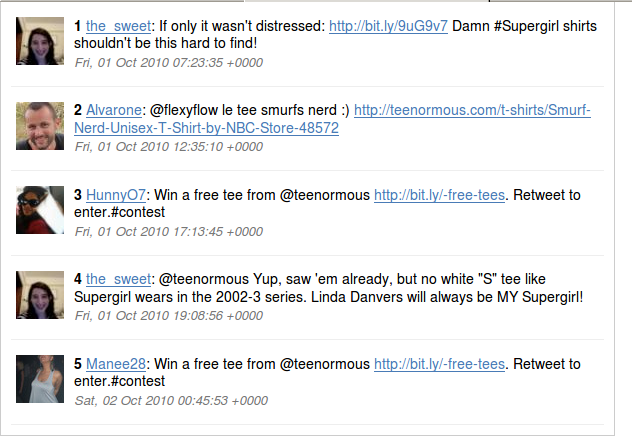 It’s so easy to use it’s laughable. A few hours later and I have an app/script written that stores the results of any twitter query (like the one we care about) into a static HTML file with them in order from oldest to newest and each tweet numbered for easy random picking of winners. It also automatically creates a new file each month. I used the Twitter CSS so it looks nice and clean. Slap it in a cron job and we have auto-archiving twitter searches. Plus – it’s in HTML format in case we want to put them online for some reason.
It’s nice sometimes to do a little coding project that’s not exactly what you typically do. Oh – and Ruby rocks.