If you want to be able to get your epubs/ebooks from your Google Drive using Koreader, here’s a free way to do it:
- Put your ebooks into Google Drive (I use FBReader, but you can just use a folder in Google Drive)
- Sign up for a free 10GB Koofr account
- Add Google Drive to your Koofr account
- Create a password to access Koofr via WedDav (it’s at the bottom of https://app.koofr.net/app/admin/preferences/password )
- Add Koofr as a WEBDAV cloud storage option in Koreader and use the password you created in the previous step
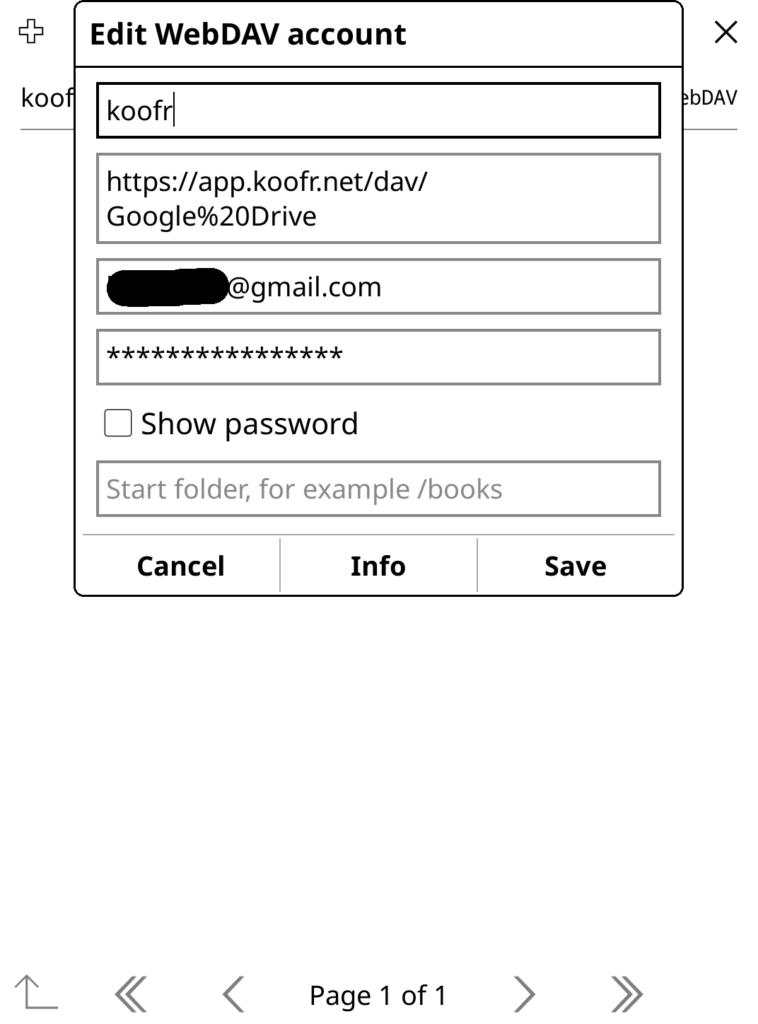
Now you can access and download your ebooks from your personal Google Drive storage from within Koreader!
Wow, this is really nice. Can you think of any way to sync with Google Play Books? This would be really amazing for people who have their books in Google Play Library, being able to read and sync them with any device which uses KO Reader eg Kindles.
No, that would be difficult.
how can i connect to onedrive for business instead google drive?
No idea
For personal OneDrive users, this worked for me: use the link “https://app.koofr.net/dav/OneDrive” for direct access, or just https://app.koofr.net/dav/ to access all my clouds connected to Koofr at once.
Try going in that direction.
How do I add something as a WebDAV cloud storage option in KOReader?
Not sure I understand the question. My post detailed how to do that.
You have to open the **file browser** first, it doesn’t work from the menu when a book is open. Then select the tools icon, then Cloud Storage, and there you can open “Add new cloud storage” with the menu button on the top left.
Took me a while to figure out too…
Do you have to install plugins, because the option doesn’t show up in android.
I just tried on my android phone and it shows up for me – you have to be in the file browser view then its in the 3rd menu from the left (the crossed tools icon).
¡¡Muchas gracias!!
Por alguna razón yo tenía la idea de que iba a hacer algo complicado, me sorprendió lo fácil que era en realidad, solo necesitaba que alguien lo dejara bien explicado, así como lo acabas de hacer tú.
Could you do a tutorial video? Maybe I failed at some point, but now I’m lost with it.
Did you get it? I don’t know where to get that web address here as shown in the pic…
Buenas,
Estoy probando el tutorial, y solo me da un problema.
Creo que es la dirección:
https://app.koofr.net/dav/Google%20Drive
No lo puede conectar (Da Error).
He probado desde Windows por si era algo del Kindle y tampoco.
En cambio, la dirección:
https://app.koofr.net/dav/Koofr
Esta si la puede encontrar, pero claro, una vez mapeada no aparece la carpeta de Google Drive, aunque lo tengo sincronizado en la Web de Koofr.
No sé si habría algún consejo que puedas darme al respecto,
Tanto para que la encuentre como para acceder directamente desde Koreader.
Gracias.
Can’t find option for cloud storage, even when i’m in the file browser.
I tried every possible way to connect wirelessly, nothing worked as intended, not the ssh server, not Dropbox, not your way with Google drive and koofr, not connecting to a WebDav server on my phone. I spent days tinkering trying to make future transfers easier and simpler. All that to avoid bending over to unplug the cable from the charger and use it to connect the phone with the ereader, or even worse – get my ass all the way to the next room and just plug it in the computer and saving myself the constant problems with wireless connections. And I don’t even need transfering that often, it took me minutes after plugging the cable to transfer so many books that it will take me a decade to read them all :)) it is not easy to be me
Hello. Do you know if anything about this has changed lately? I just switched to a new computer and this does not work anymore. I have never had trouble before, but now it just says “cannot fetch list of folder contents.”
I get that occasionally and just retry then it works.
But – what does a new computer have to do with anything?
Hello!
Thanks for the simple guide.
I was wondering if there’s a an auto sync feature for the library? As in books in the library will appear and disappear both locally and remotely in the GDrive folder. I’m only aware of the option to upload books manually to GDrive.
Thanks a bunch :)
not that I am aware of
That was surprisingly easy. Thank you for the tutorial, it was the only cloud method that worked for me on koreader. And the bonus is I can use it alongside KBreader on my phone. I just wish I could sync up read states. I guess that will be the next project…
Hope my signup to koofr gave you some bonus storage!
Syncing read states is builtin to koreader. Are you having a problem setting it up?
For me it says that is not possible to get the content of the server. What did I do wrong?
That could be 100 different things. That’s way too vague to actually help you.
I think koofr has changed recently </3 (or at least for me in the UK) They do not allow any free external connections at all, you have to pay for a subscription to connect to google drive etc