If you want to be able to get your epubs/ebooks from your Google Drive using Koreader, here’s a free way to do it:
- Put your ebooks into Google Drive (I use FBReader, but you can just use a folder in Google Drive)
- Sign up for a free 10GB Koofr account
- Add Google Drive to your Koofr account
- Create a password to access Koofr via WedDav (it’s at the bottom of https://app.koofr.net/app/admin/preferences/password )
- Add Koofr as a WEBDAV cloud storage option in Koreader and use the password you created in the previous step
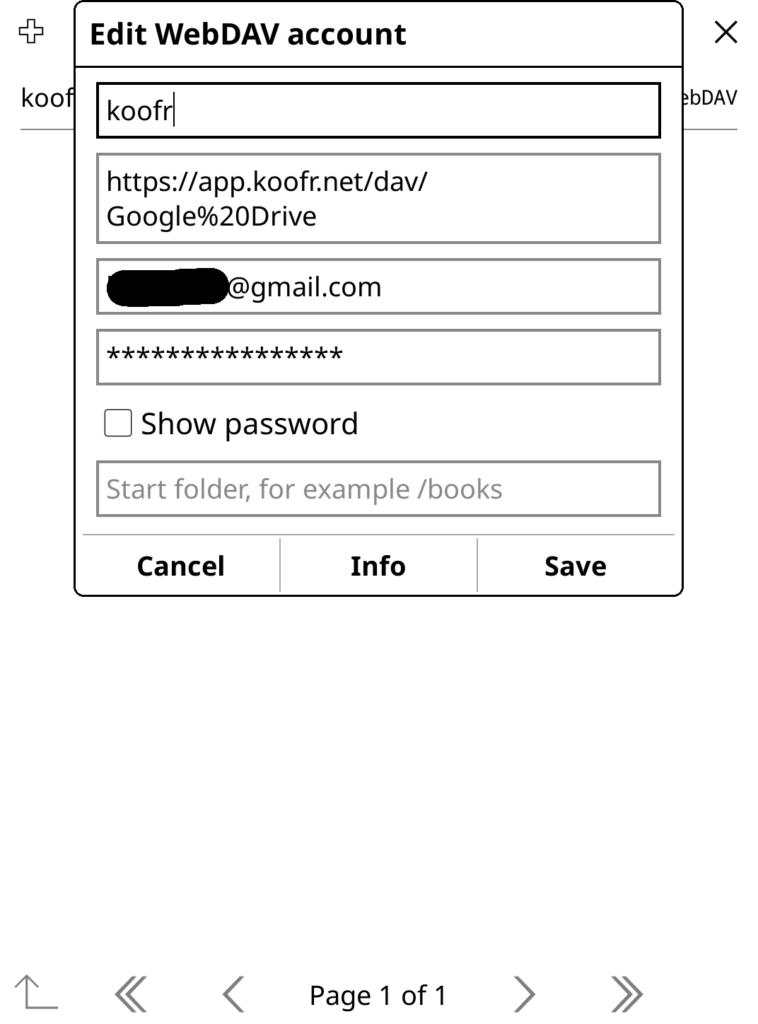
Now you can access and download your ebooks from your personal Google Drive storage from within Koreader!
Wow, this is really nice. Can you think of any way to sync with Google Play Books? This would be really amazing for people who have their books in Google Play Library, being able to read and sync them with any device which uses KO Reader eg Kindles.
No, that would be difficult.
how can i connect to onedrive for business instead google drive?
No idea
How do I add something as a WebDAV cloud storage option in KOReader?
Not sure I understand the question. My post detailed how to do that.
You have to open the **file browser** first, it doesn’t work from the menu when a book is open. Then select the tools icon, then Cloud Storage, and there you can open “Add new cloud storage” with the menu button on the top left.
Took me a while to figure out too…
¡¡Muchas gracias!!
Por alguna razón yo tenía la idea de que iba a hacer algo complicado, me sorprendió lo fácil que era en realidad, solo necesitaba que alguien lo dejara bien explicado, así como lo acabas de hacer tú.
Could you do a tutorial video? Maybe I failed at some point, but now I’m lost with it.